Search
Search
Login
Toggle navigation
Home
Link & Register
eServices
Property Tax
Payment
Contact Us
Welcome to the Muskoka Lakes Online Portal
is logged in.
Already have an account?
Login now
User Name:
Password:
Login
New User?
To Link & Register your tax account, click
Show Me How
Show Me How
What type of Account are you trying to add?
Company:
Jurisdiction:
Account Number:
Access Code / Pin:
Please Notify me by Email that my Utility Bill is Ready:
Select this option if you want to receive your Utility Bill online.
I will View my Utility Bill Online:
Your Utility Bill will be available online through this website using your Registered Account and can be printed from the Billing Summary page if required.
Attach a PDF Copy of the Utility Bill to the Email:
A PDF Copy of your Utility Bill will be attached to the notification e-mail you receive.
Email Address:
Email where the Utility Bill will be sent. Must be a valid Email address.
Send Verification Email
Verification Code
6-Digit Verification Code sent to the email.
Please Notify me by Email that my Property Tax Notice is Ready:
Select this option if you want to receive your Property Tax Notice online.
I will View my Property Tax Notice Online:
Your Property Tax Notice will be available online through this website using your Registered Account and can be printed from the Billing Summary page if required.
Attach a PDF Copy of the Property Tax Notice to the Email:
A PDF Copy of your Property Tax Notice will be attached to the notification e-mail you receive.
Email Address:
Email where the Property Tax Notice will be sent. Must be a valid Email address.
Send Verification Email
Verification Code
6-Digit Verification Code sent to the email.
Cancel
Save
Delete
Back
Just a couple more steps to setup your personal access account for the site.
Username
- must be at least 5 characters long, cannot contain spaces or any special characters. Please use only letters, numbers, periods, dashes or underscores.
Password
- password must contain 8 characters including at least 1 special character. (i.e. $ # @ %)
Please note, once registered for eBilling, a bill for the tax roll will no longer be printed.
User Name:
Email Address:
Send Verification Email
Verification Code:
Password:
Confirm Password:
Back
Save
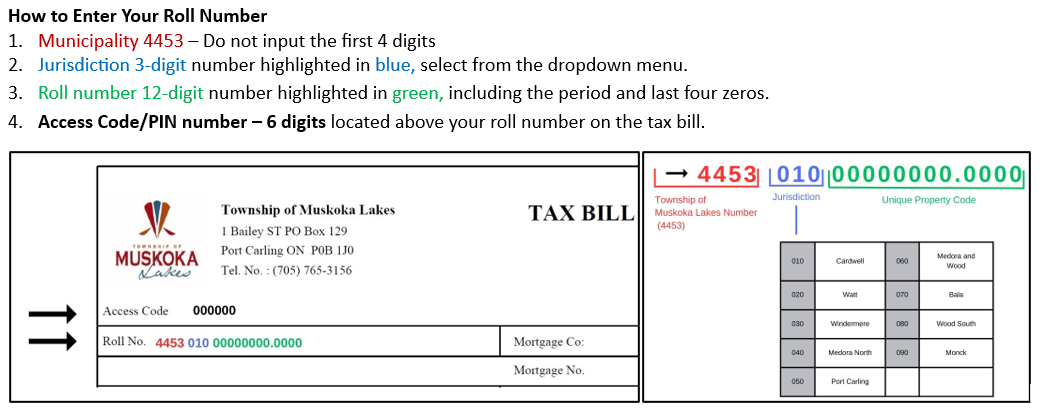
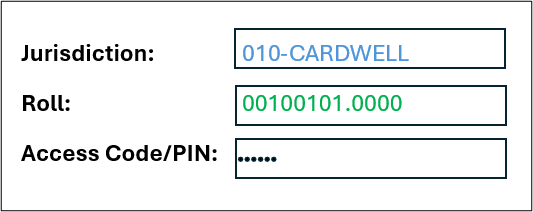
Example of How to Enter your Roll Number and PIN/Access Number